
This application will copy files to any drive.
- Range select which items you want.
- Pick the source drive and the destination drive
- Select date range to limit what is copied.
Just input your file/ folder information below to add your information. It will only copy newer files when it overwrites.
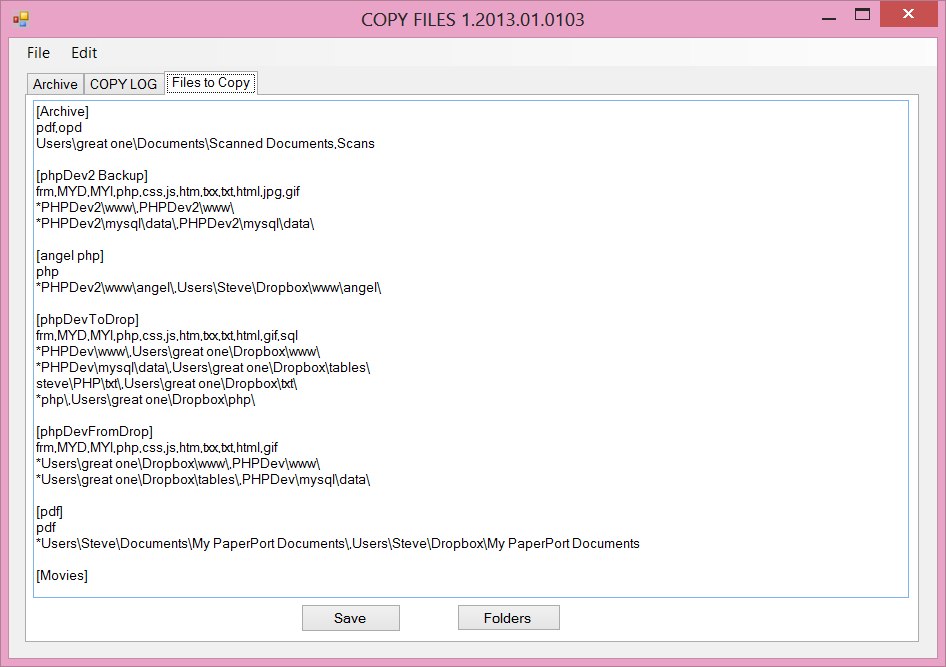
File folder Selection
Follow these steps:
- Enter in a heading in brackets.
- Add extensions example: jpg,gif,png or * for all files on the second line.
- Enter in the folder to copy followed by a destination folder separated by a comma. An * at the beginning of the source will copy all the sub folders below also. Repeat for all folders to copy on a seperate line.
- Leave off the drive letter of the source and destination directories. You select the drive letters at copy time.
- Press save and go to the first tab.